
 Terra Echo Labs
Plumb
Audio Analyzer
Fresh Squeezed Stats.
Drop in a master and get every number that matters — true peak, LUFS, dynamics, stereo image — with a pass/fail check against real streaming specs and a report you can send with the mix.
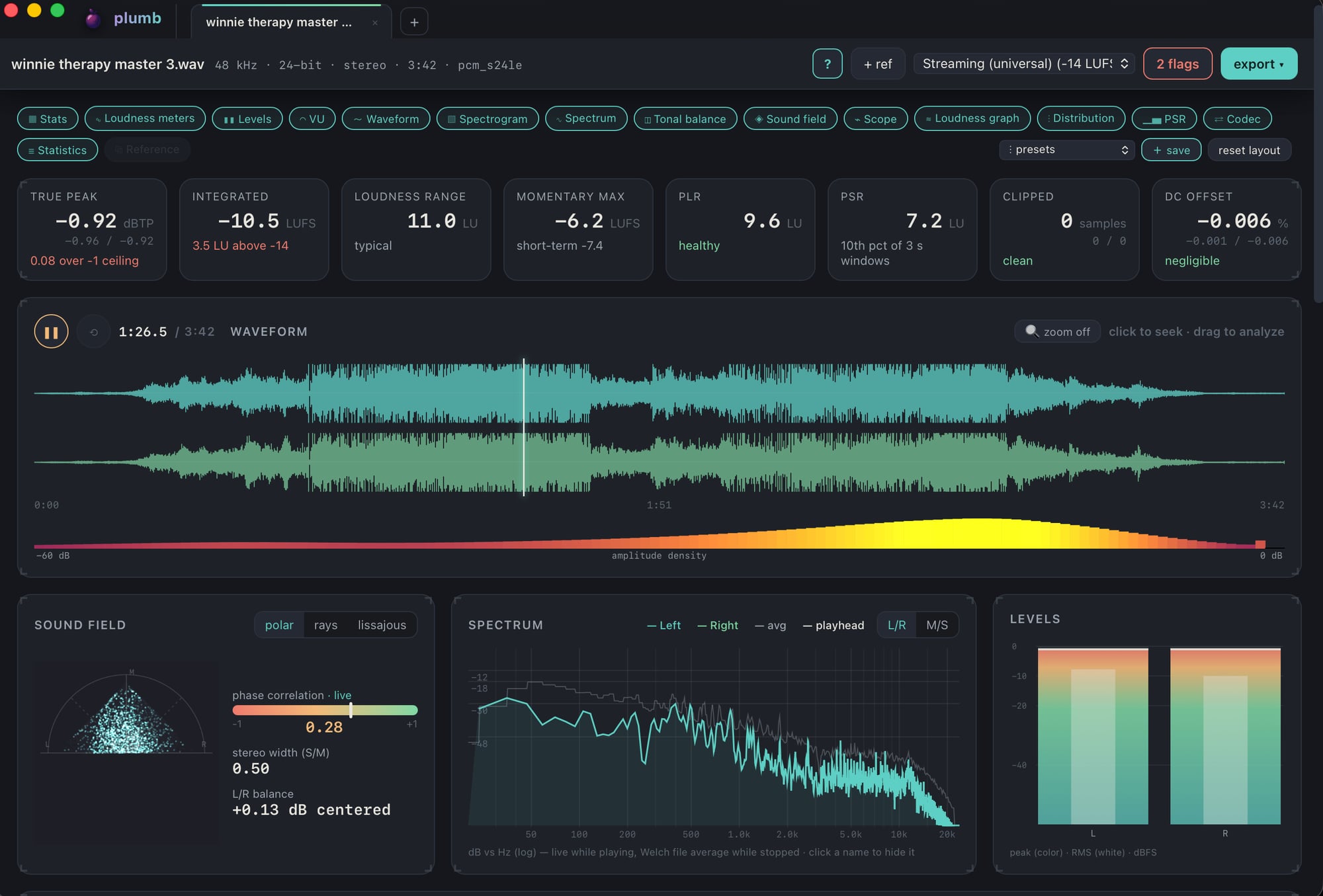
Plumb is a native macOS audio analyzer for anyone who cares about their audio. Drop in any format and get instant, live readings on a fully modular layout — true peak, LUFS, dynamics, clipping, stereo image, tonal balance — with meters that turn your sound into stunning visuals, a pass/fail check against real streaming specs, and a report you can send right alongside the master.
A look inside
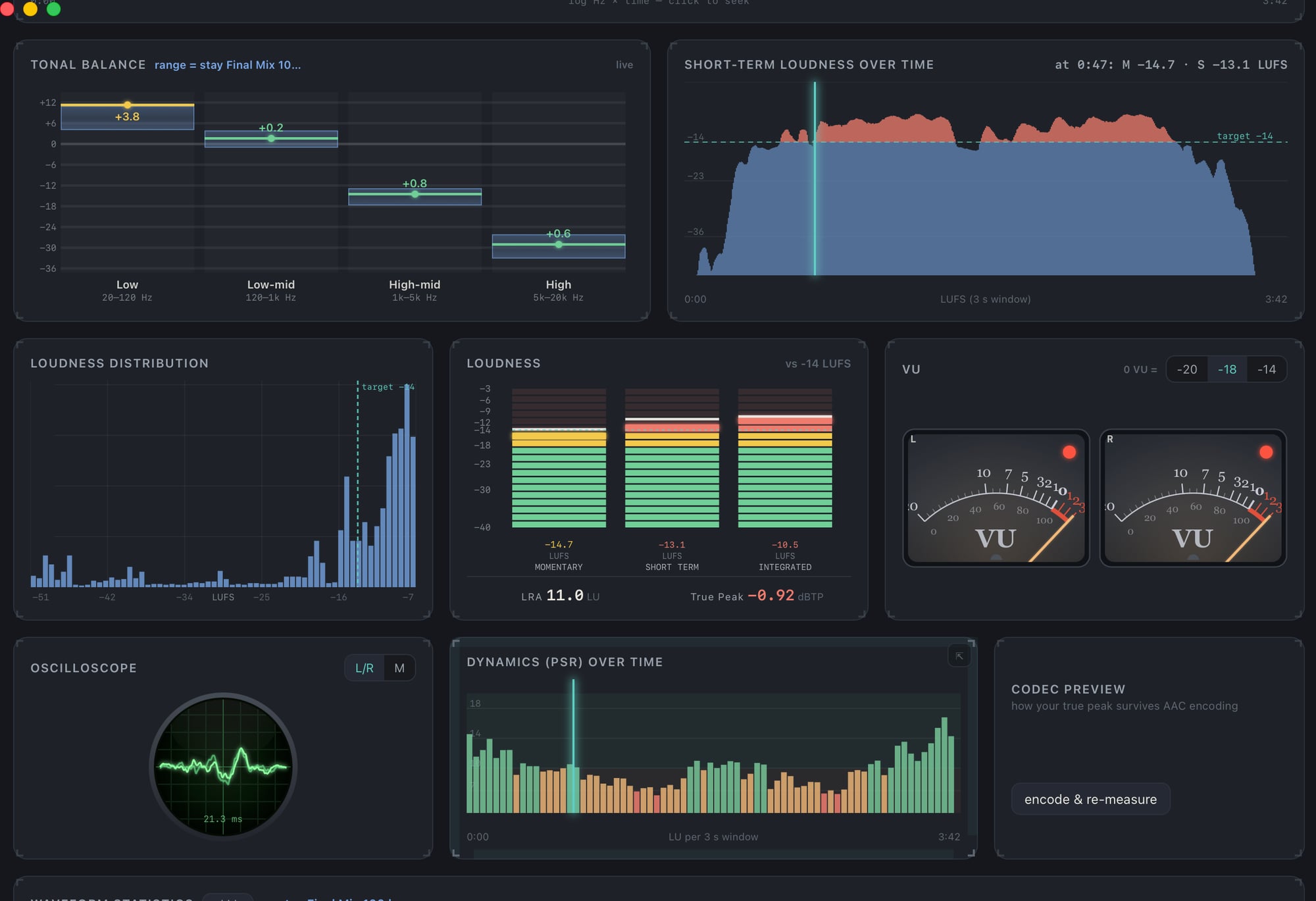
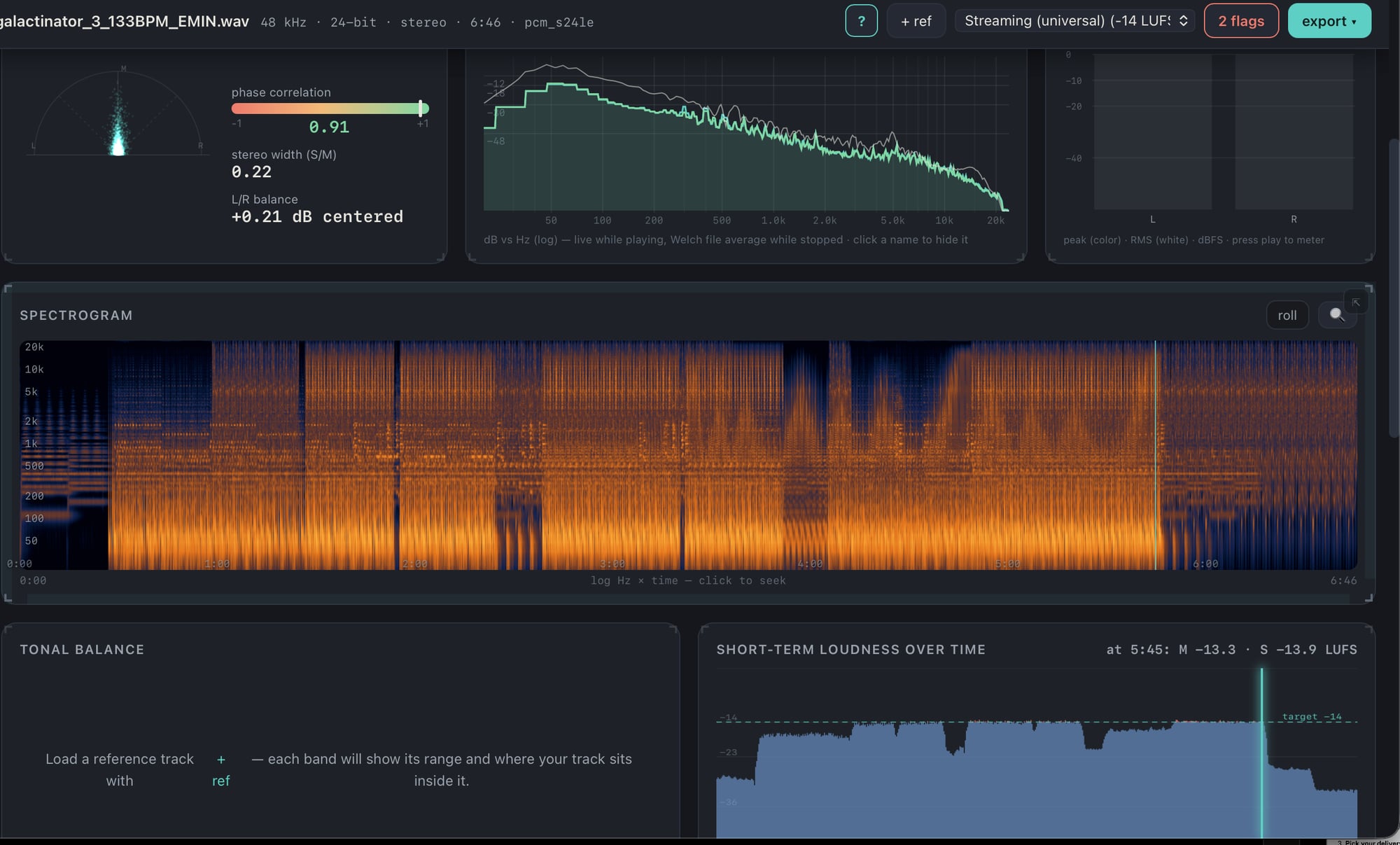
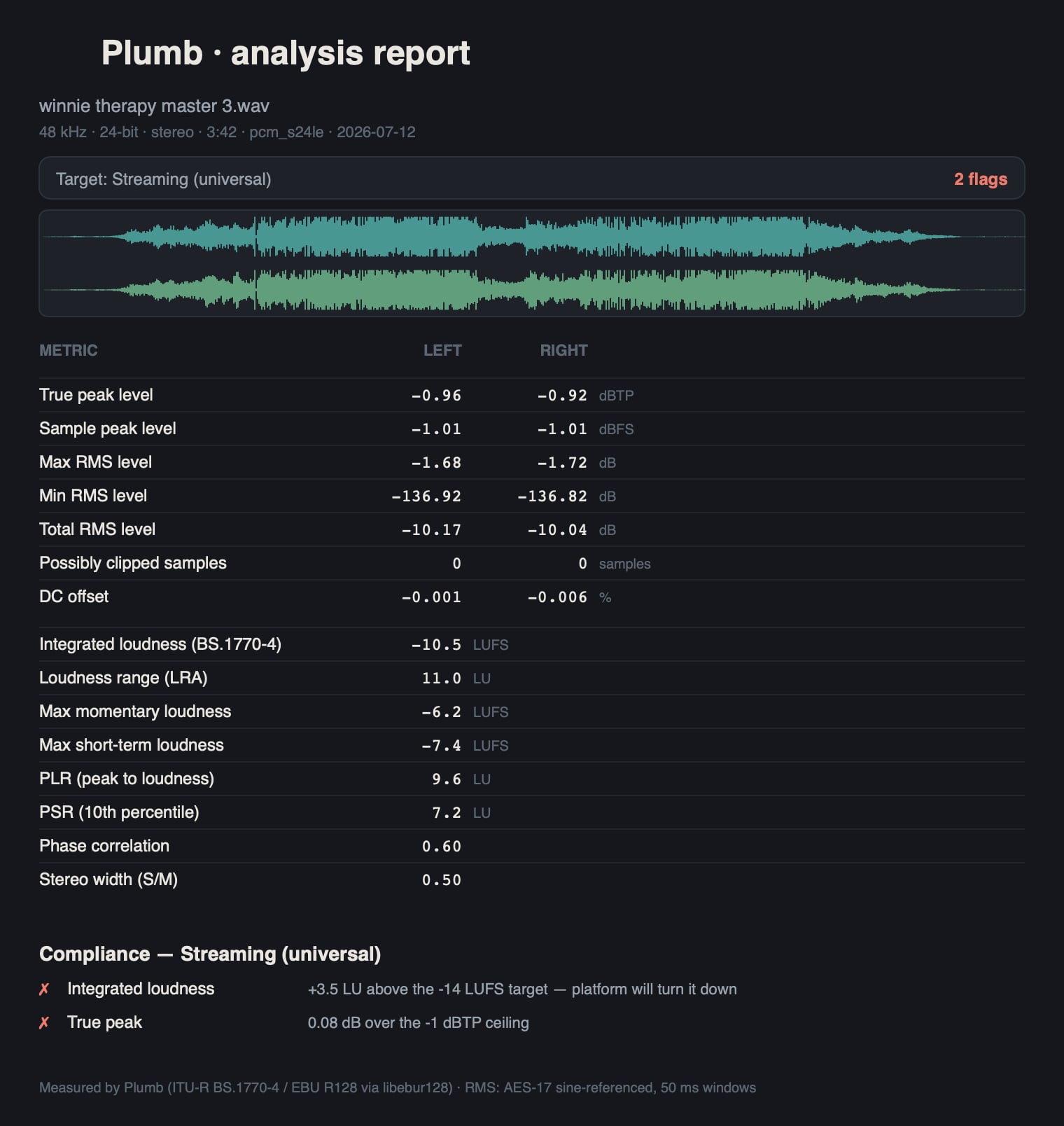
Quick start
- Drop a file onto the window (or click to browse). WAV, AIFF, FLAC, ALAC, MP3, AAC, OGG, CAF — anything you'd actually bounce.
- Plumb analyzes the whole file in seconds and lights up the dashboard.
- Pick your delivery target (top right) — Streaming −14, Apple Music, Spotify Loud, CD, broadcast, podcast, or "Mix — ready for mastering?".
- Read the flags badge: green = ship it, red = the exact reason it'll get turned down, clipped, or bounced back.
- Press space to listen. Every meter follows the audio live.
Hover anything with the ? toggle on and Plumb explains what the number means and why you'd care. The whole app is self-documenting.
The stats row
- True Peak — inter-sample peaks (dBTP): what DACs and lossy codecs actually hit, not just sample values. Over the ceiling = distortion after encoding.
- Integrated — whole-file loudness (LUFS, BS.1770-4): the number streaming platforms normalize by.
- Loudness Range — LRA: how dynamic the track is start-to-finish.
- Momentary Max — the loudest 400 ms moment (and short-term below it).
- PLR — peak-to-loudness ratio: overall crest. Low PLR = heavily limited.
- PSR — 10th-percentile peak-to-short-term ratio: how squashed the loud parts feel. The honest "did I over-limit it" number.
- Clipped — runs of consecutive full-scale samples: the fingerprint of hard clipping, per channel.
- DC Offset — waveform asymmetry that eats headroom.
The modules
Everything below the stats row is a module — show/hide any of them with the toolbar chips, drag by an edge to rearrange, resize from any corner, or pop one out into its own live window (great for a second display).
- Waveform — the transport. Click to seek, drag to analyze just a section (the numbers re-run for the selection), loop it, scroll-zoom with the zoom toggle. The amplitude-density strip below shows where the level lives.
- Spectrogram — log-frequency, flat terrain, or rolling live.
- Spectrum — Welch-averaged file curve plus live playback overlay; L/R or M/S; click legend names to hide lines.
- Tonal balance — load a reference and each band shows the range where the reference sits and where your track lands inside it. Live marker while playing.
- Sound field — goniometer (polar / rays / lissajous), phase correlation, stereo width, L/R balance. Mono-safety at a glance.
- Loudness meters — momentary / short-term / integrated bars with zone colors keyed to your target, like a hardware loudness meter.
- Loudness graph — loudness over time; red where you're above target.
- Levels / VU / Scope — peak+RMS bars, classic needle VU (0 VU at −20/−18/−14), and an oscilloscope, all live during playback.
- Distribution / PSR graph — histograms of loudness and dynamics; see the shape of the master, not just the average.
- Codec preview — encodes to AAC and re-measures true peak, so you know if Spotify/Apple's encoder will push you over.
- Statistics — the full RX-style table, L/R per channel, with pass/fail notes against the current target.
A/B against a reference
Click + ref and load the commercial track you're chasing.
- A/B buttons appear in the transport — or just hit X to swap.
- B plays loudness-matched, so you compare quality, not volume.
- Switching is crossfaded — no pops, no gaps.
- Tonal balance, spectrum overlay, and the stats table all pick up the reference so you can see the differences, not just hear them.
Album mode
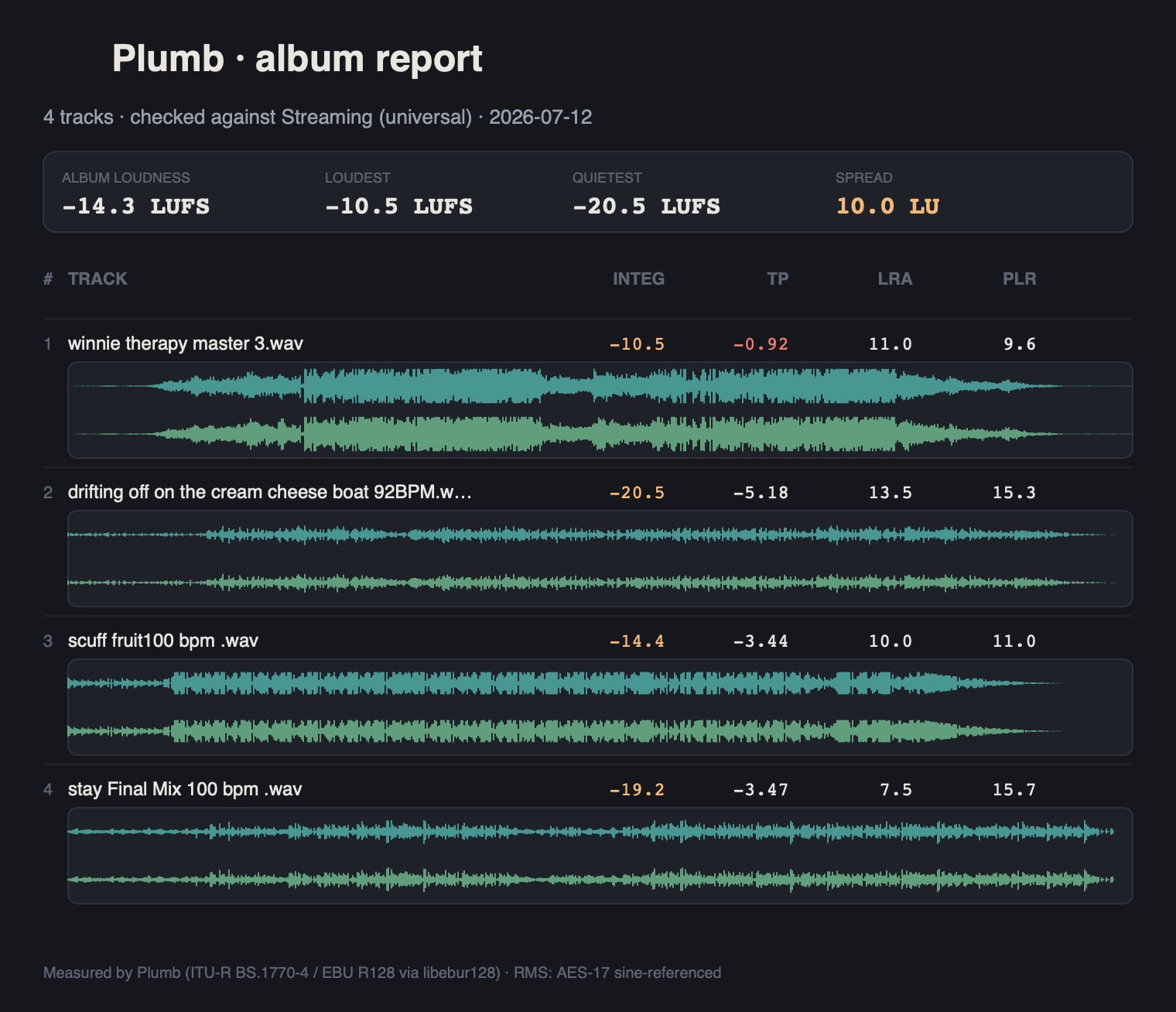
Drop several files (or a folder) and every track gets a tab, plus an album view: per-track table, album loudness, loudest/quietest track, spread, and outlier flags — the "is the EP consistent" check in one screen. Click a row to jump to that track.
Presets & layout
The presets menu has ready-made workspaces — Everything, Just the numbers, Graphs, Meters, Visualizers, Loudness, Tonal/spectral, In-depth, Mastering, Mixing. Rearrange whatever you like and hit + save to keep your own named preset. Your layout persists between launches; reset layout brings back the default.
Exporting
export ▸ opens the export dialog:
- Scope — this file, or the whole album.
- Format — PDF / PNG / SVG report (with the waveform and your logo'd header) or CSV for spreadsheets.
- Reports carry the full metric table and the pass/fail summary — made to be sent along with a master or attached to delivery notes.
Frequently asked
What does Plumb measure?
True peak (dBTP), integrated / short-term / momentary loudness (LUFS, BS.1770-4), loudness range, PLR, PSR, clipping, DC offset, stereo width, and phase correlation — plus spectrum, spectrogram, and tonal-balance views, all live during playback.
Will it tell me if my master passes Spotify or Apple Music?
Yes. Pick a delivery target and Plumb checks your file against the real spec, with a plain-language reason for every flag. It even encodes an AAC preview and re-measures true peak, so you know what the platform's encoder will actually do to your file.
How much does Plumb cost?
$25, one time. No subscription, no per-file credits, no account.
Does Plumb work offline?
Yes — completely. All analysis runs locally, no internet connection is needed, and your audio never leaves your computer.
Which computers are supported?
macOS 11 Big Sur or later — Apple Silicon and Intel (universal binary).
Try Plumb
One-time $25.
macOS 11+ — Apple Silicon & Intel
Get PlumbBy downloading, you agree to Plumb's EULA and Privacy Policy.